
Every few months someone announces „the free Photoshop killer“. Usually it’s a hobby project that quietly disappears. ArtCraft is different – not because it has already replaced Adobe or Microsoft, but because of how it was built, how quickly it’s moving, and what it tells us about where AI-assisted software development is heading.
In early October 2026, developer Brandon Thomas released a set of open-source desktop applications that recreate the core of Adobe Creative Cloud – and shortly after, Microsoft Office. They’re written in Rust, run on Windows, macOS and Linux, and were built largely with AI.
We’ve been testing several of the apps. Here’s what they are, what works, what doesn’t, and why the project matters even if you never install it.
Why ArtCraft exists: a cancellation fee too many
ArtCraft started as an open-source studio for AI image and video creation. The trigger for the Adobe clones was personal frustration: Thomas said he had been „bit by the dark pattern cancellation fee one too many times“.
He’s not alone. Adobe’s annual plans billed monthly carry an early termination fee, and in 2026 Adobe agreed to a $150 million settlement with the US Justice Department over how it sold and cancelled Creative Cloud subscriptions – while denying wrongdoing. For many users, „subscription fatigue“ with Adobe and Microsoft has become a real pain point.
ArtCraft’s answer: free, open-source apps with no account, no subscription, no telemetry and no cloud requirement.
What’s in the suite
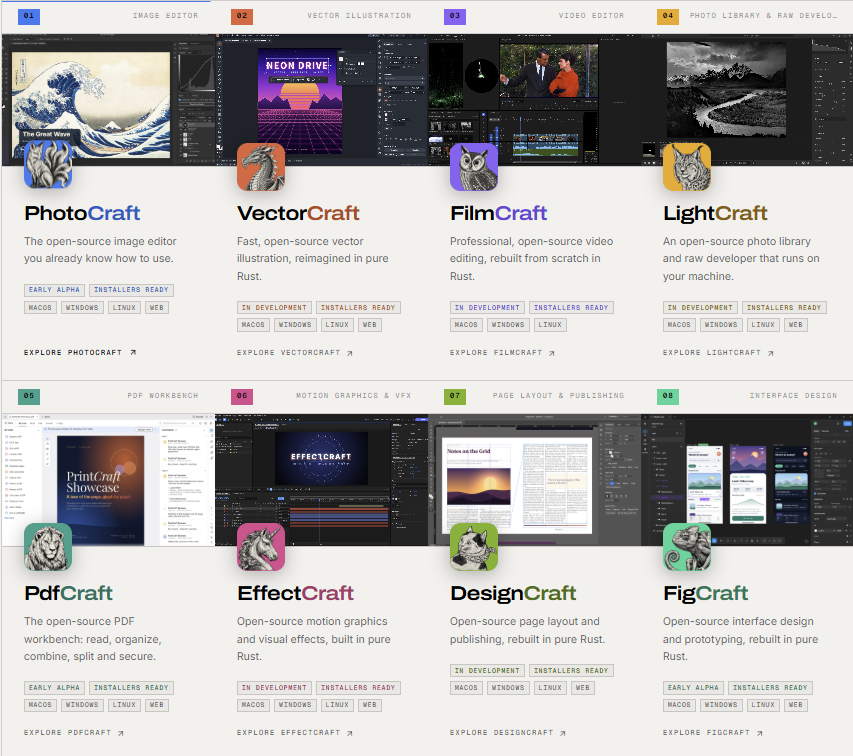
ArtCraft lists 13 applications, all with a „-Craft“ name. Each targets a familiar commercial product:
| ArtCraft app | Inspired by | Purpose |
|---|---|---|
| PhotoCraft | Adobe Photoshop | Image editing |
| VectorCraft | Adobe Illustrator | Vector illustration |
| FilmCraft | Adobe Premiere Pro | Video editing |
| EffectCraft | Adobe After Effects | Motion graphics and VFX |
| LightCraft | Adobe Lightroom | Photo library and RAW development |
| DesignCraft | Adobe InDesign | Page layout |
| PdfCraft | Adobe Acrobat | PDF reading and organising |
| WordCraft | Microsoft Word | Word processing |
| GridCraft | Microsoft Excel | Spreadsheets |
| DeckCraft | Microsoft PowerPoint | Presentations |
| FigCraft | Figma | Interface design |
| SoundCraft | DAW | Audio |
| CADCraft | CAD tools | Drafting |
Key facts:
- Language: pure Rust, with WebAssembly builds for some apps that run in a browser
- Platforms: Windows, macOS and Linux (PdfCraft also offers FreeBSD, ARM64 and portable builds)
- Licence: dual MIT / Apache 2.0 – free for personal and commercial use
- Approach: described as „clean-room“ reimplementations – rebuilding behaviour from public specifications and observation, without copying original source code
- Popularity: within days, the repositories collected tens of thousands of GitHub stars – around 56,000 combined by mid-October, with PhotoCraft alone near 28,000
Built with AI – in a weekend
The most remarkable part is the development story. According to Thomas, he turned ArtCraft into the first seven Adobe-inspired apps over a single weekend, using Anthropic’s Claude Opus 5.5 as his main development tool. Thomas is an experienced Rust developer with around a decade on large projects – and says he has written code only with AI tools since early 2026.
His public statements have been bold – „Software is over“ – and his early promise of 100% feature parity within a month was quickly scaled back. PhotoCraft’s own roadmap currently puts it at roughly 25–35% of what a professional needs for daily work.
The Office clones are earlier still. As of version 0.3.0, ArtCraft claims:
- WordCraft: ~87% of Word’s ribbon commands, ~62% overall feature parity, reads and writes DOCX
- GridCraft: pre-alpha, ~89% of Excel’s ribbon commands and ~93% of worksheet functions
- DeckCraft: early development, ~79% of PowerPoint features
Treat those percentages as the developer’s own estimates – but even at a fraction of that, building this much functional software this fast would have been unthinkable a couple of years ago.
ArtCraft also designs its apps for AI agents: every menu item, tool and dialog maps to a single command available through the UI, a command-line interface, a JSON control channel and an MCP server. PhotoCraft alone exposes more than 500 commands – meaning an AI agent can, in principle, do anything a user can do with the mouse.
Hands-on: what we found
PdfCraft – the surprise hit
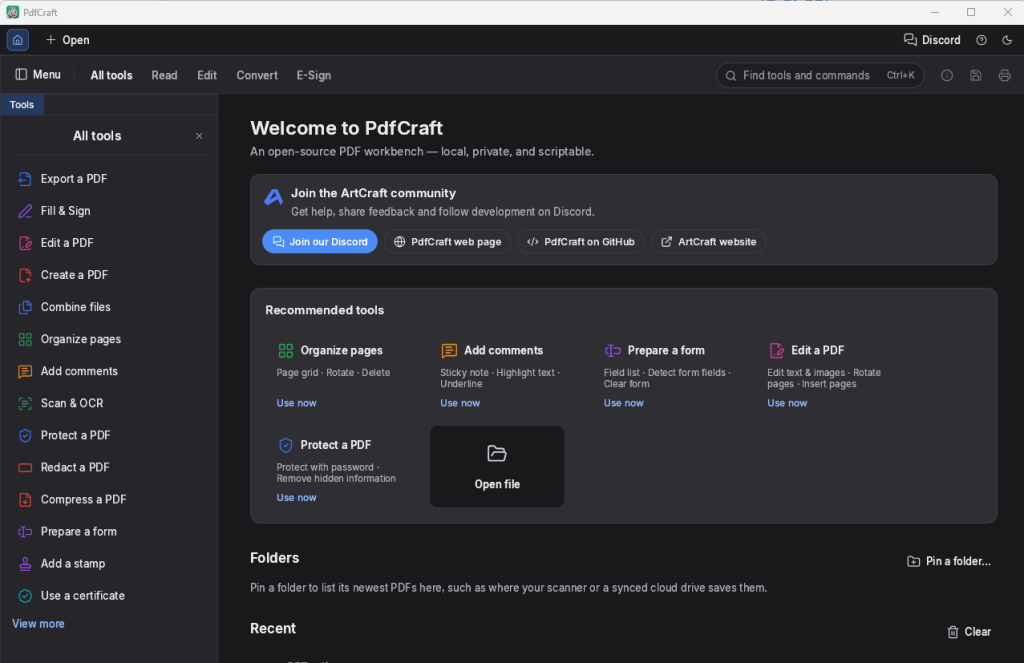
PdfCraft has quickly become one of the most popular apps in the suite, and in our testing it’s easy to see why:
- Familiar layout. If you’ve used Acrobat, you’ll find your way immediately – thumbnails, toolbars, page organiser.
- No bloat. It starts quickly, has no account sign-in, no upsell banners, no cloud prompts.
- The basics work well. Merging PDFs, splitting documents, extracting, rotating, deleting and reordering pages all worked reliably in our tests. ArtCraft says it preserves links, form fields, layers and bookmarks when combining files.
- Solid rendering – ArtCraft reports zero crashes across a test corpus of nearly 1,000 PDFs, and it opens password-protected files (RC4 to AES-256) while honouring permissions.
- Command-line tool for batch processing – handy for admins.
For everyday office tasks – combining scanned invoices, removing pages, splitting a large document – PdfCraft already covers what many users actually need from Acrobat. Advanced features such as full text editing, OCR and professional prepress are another matter.
PhotoCraft – good enough for basic editing
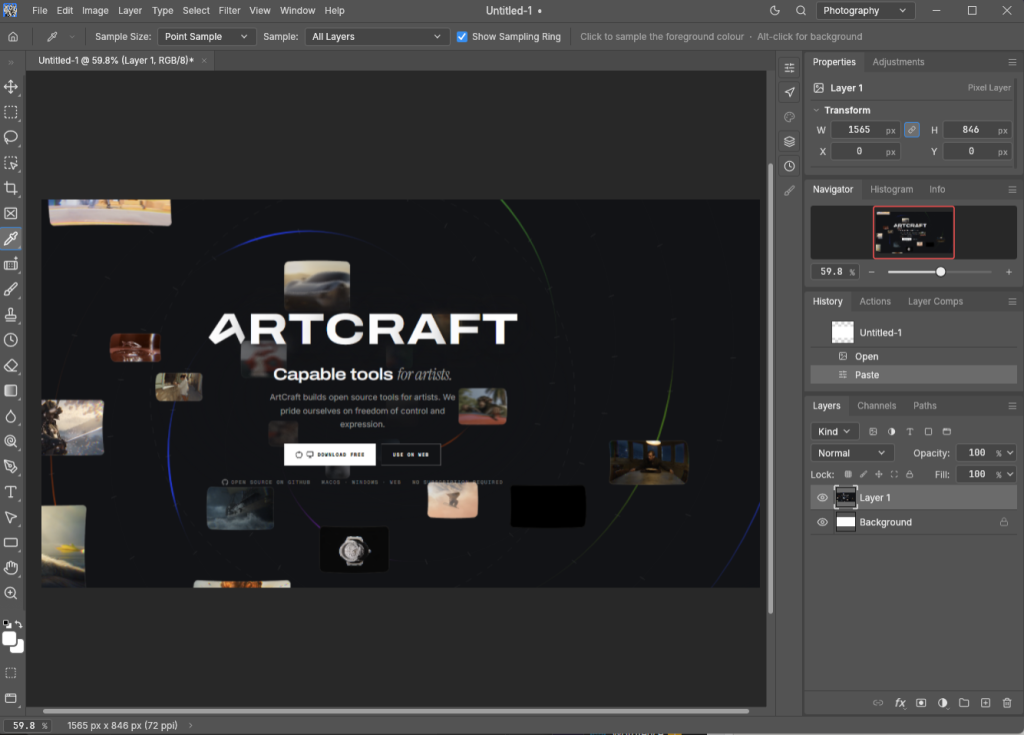
PhotoCraft is the most advanced of the creative apps, and a growing number of users are already using it for basic photo editing: cropping, resizing, layers, adjustments, simple retouching and exporting.
What users like most:
- It’s fast. Start-up and common operations feel snappy.
- The environment is familiar. Photoshop users recognise the layout, panels and tools.
What’s missing: generative AI tools, Content-Aware Fill, plug-in compatibility, around 20 Photoshop tools and professional colour management. Early users have also reported issues with keyboard shortcuts and some editing workflows. The project itself says PhotoCraft „cannot yet replace Photoshop for daily professional work“.
WordCraft – almost like the real deal
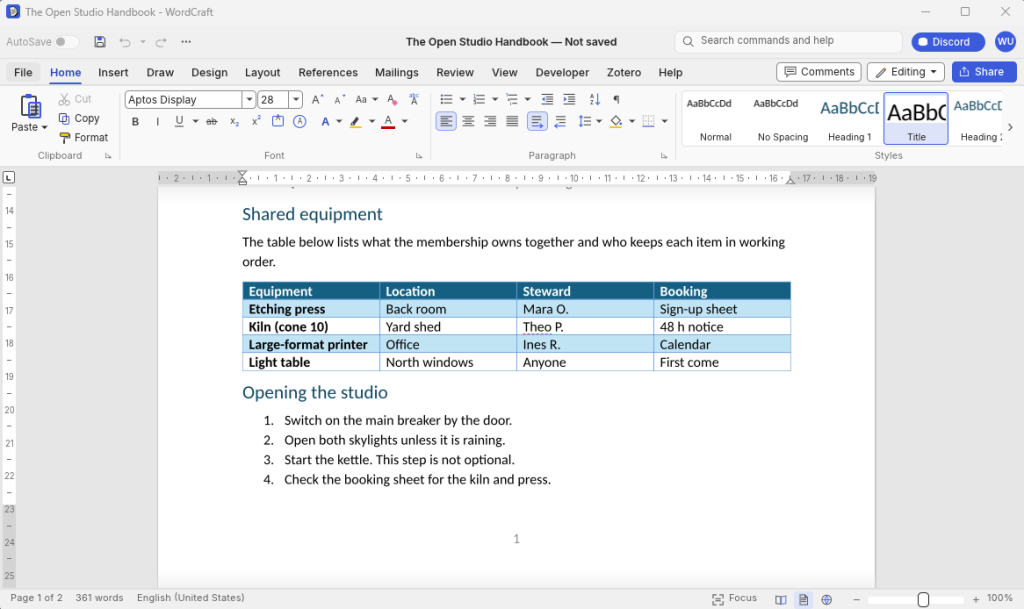
WordCraft is where the Office side of ArtCraft impressed us most. Open it for the first time and it’s genuinely hard not to do a double take: the ribbon, the tabs, the formatting controls and the overall layout feel almost exactly like Microsoft Word. Anyone who has used Word in the last fifteen years can start typing without a second of training.
What works well in our testing:
- Everyday documents – letters, reports, meeting notes and simple templates – are created and edited without friction.
- DOCX files open and save, so you can exchange documents with Word users.
- Common formatting – styles, headings, lists, tables, fonts and paragraph settings – behaves the way Word users expect.
- Like the rest of the suite, it’s fast: it starts quickly and stays responsive, with no sign-in, no cloud prompts and no Copilot banners.
Where you’ll notice it’s not (yet) Word:
- ArtCraft itself estimates that while around 87% of Word’s ribbon commands are present, real-world feature parity is closer to 62% – many buttons exist, but not every feature behind them is complete.
- Complex documents with advanced layouts, fields, macros, embedded objects or heavy corporate templates may not look identical after a round trip between WordCraft and Word.
- Features many businesses depend on – advanced track changes and review workflows, mail merge, add-ins and integration with Microsoft 365 collaboration – should be tested carefully before you rely on them.
GridCraft – promising, but slow with big files
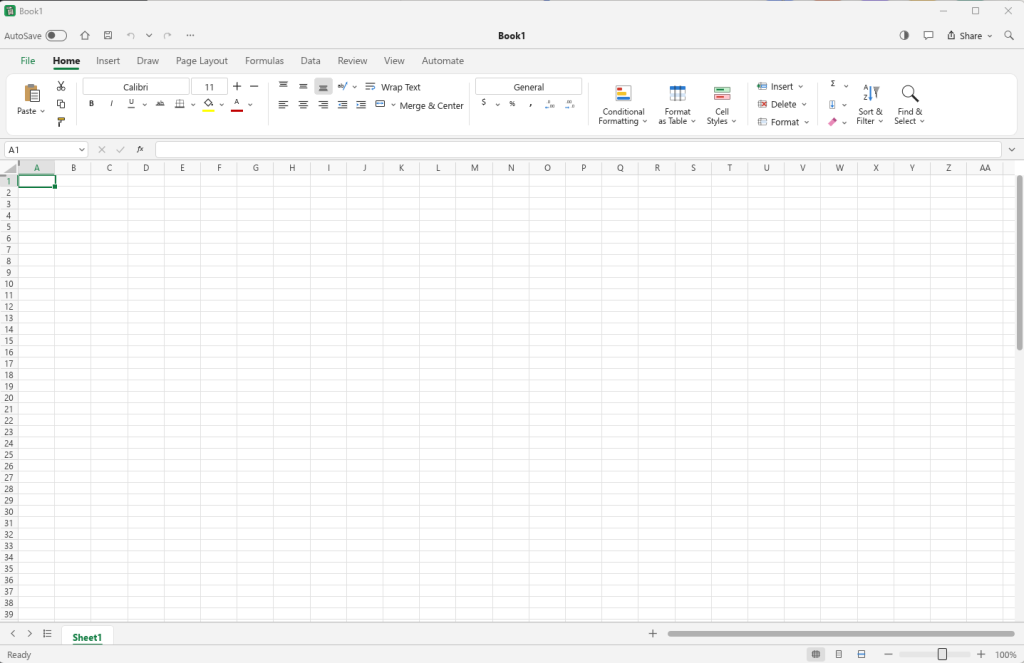
GridCraft handles everyday spreadsheets and a broad set of functions. Where it struggles is large files with many columns: opening them is noticeably slow. In our testing, this is a known issue – the file loading is currently single-threaded – and the kind of problem that’s typically addressed quickly in a project moving at this pace.
Performance overall
Being written in Rust, the apps generally feel fast and responsive – start-up times are short and the UI reacts quickly. Cross-platform support is a real plus: the same tools on Windows, macOS and Linux is something neither Adobe nor Microsoft fully offers.
Development speed: a new version every few days
What stands out most is the pace. During our testing, new versions appeared every few days, often fixing issues reported only shortly before. A small team and a fast-growing community of contributors are submitting bug reports and pull requests, and the developer funds the work through ArtCraft’s existing AI business rather than donations.
That speed cuts both ways: bugs get fixed quickly, but things also change quickly – which is exactly what you don’t want in production.
Is it ready for production?
No – not yet. And the developer says so himself, calling it „super early alpha“.
Reasons to wait before using ArtCraft for business-critical work:
- Feature gaps compared to Adobe and Microsoft, especially for professional workflows
- Compatibility – complex Office documents, macros, advanced PDF features and Adobe file formats may not round-trip perfectly
- Stability and rapid change – frequent releases mean frequent changes
- No enterprise support, deployment tooling or long-term support commitments
- Code quality and security review – a huge, mostly AI-generated codebase is new territory; independent security audits will matter
- Distribution – download links have moved between the website and GitHub; make sure you get builds from the official repositories
Where it’s worth trying today:
- PdfCraft for merging, splitting and organising PDFs
- PhotoCraft for basic image editing
- Lab, homelab and Linux desktops – see Building a Homelab in 2026
- Organisations evaluating alternatives to rising subscription costs – as a pilot, not a migration
As always with new software, test with copies of your files, not the originals – and make sure your backups are in order.
Why this matters: what ArtCraft tells us about AI
Whether ArtCraft eventually rivals Adobe and Microsoft or not, it’s a striking example of how far AI-assisted development has come:
1. The cost of building software is collapsing. One experienced developer with an AI model produced a suite of desktop applications in a timeframe that used to require large teams and years. Even if parity claims are optimistic, the gap between „idea“ and „working software“ has shrunk dramatically.
2. Subscription moats are under pressure. Large software vendors have relied on the sheer effort required to replicate their products. When that effort shrinks, pricing practices like cancellation fees and forced bundles become easier to challenge.
3. Software is being built for AI agents, not just humans. ArtCraft’s design – every function available as a command for agents via CLI and MCP – points to a future where AI assistants operate applications directly. We explored this trend in AI Agents for Sysadmins and Agentic AI in the Service Desk.
4. The hard part shifts to quality, security and trust. Writing code is getting cheap. Testing, security review, compatibility, support and long-term maintenance are not. Those will decide which AI-built projects become trusted tools – and which stay impressive demos.
5. Expect more of this. Commentators are already speculating which subscription products come next. For IT teams, that means more choice – and more need to evaluate unfamiliar software carefully, including the shadow AI and shadow IT risks of users installing new tools on their own.
Conclusion
ArtCraft isn’t a Photoshop or Office replacement – yet. It’s alpha software with real gaps, known bugs like slow loading of large spreadsheets, and a pace of change that makes it unsuitable for production. But PdfCraft already handles everyday PDF tasks well and without bloat, PhotoCraft is usable for basic editing in a familiar, fast environment, and the whole suite runs on Windows, macOS and Linux.
More importantly, ArtCraft is one of the clearest signs yet of where AI is taking software: faster development, more competition for subscription giants, and applications designed for both humans and AI agents. It’s a project worth watching – and, for basic tasks, worth trying.
Have you tried PdfCraft or PhotoCraft? Share your experience in the comments.
Related reading:

Napsat komentář