
Every IT team has a disaster recovery plan. Far fewer have proof that it works. The usual reason isn’t laziness – it’s fear. Testing DR sounds like pulling the plug on production and hoping for the best, and no one wants to explain to the CEO why the ERP system went down on a Tuesday afternoon „for a test“.
The good news: most DR testing doesn’t touch production at all. With the right approach, you can verify backups, recovery procedures and even complete failovers in isolation – and only rarely need a real switchover.
This guide explains five levels of DR testing, how to run each one safely, what to measure and how to document results.
Why testing matters more than ever
- Backups fail silently. Jobs report „success“ while the data is incomplete, encrypted by ransomware or unrestorable because of a missing driver, key or dependency.
- Environments drift. New systems, changed IP ranges, retired servers and staff turnover break procedures that worked last year.
- RTO on paper ≠ RTO in reality. Until you’ve restored a 2 TB database over your actual network, your four-hour RTO is a guess.
- Regulators and insurers now ask for evidence. NIS2, DORA and cyber insurers all expect documented, regular recovery tests.
The five levels of DR testing
Think of DR testing as a ladder. Lower levels are cheap, safe and frequent; higher levels are realistic, expensive and rare. A mature programme uses all of them.
| Level | Test | Touches production? | Typical frequency |
|---|---|---|---|
| 1 | Automated backup verification | No | Daily / weekly |
| 2 | File and object restore tests | No | Monthly |
| 3 | Tabletop exercise | No | Twice a year |
| 4 | Isolated full-system recovery | No | Quarterly (critical systems) |
| 5 | Live failover / switchover | Yes – planned | Annually (if you have a DR site) |
Level 1: Automated backup verification
Most modern backup tools can verify backups automatically:
- Integrity checks – checksums confirm that backup data isn’t corrupted.
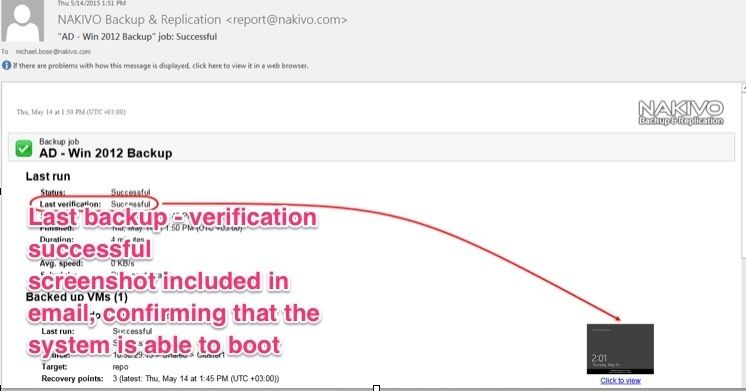
- Boot verification – the tool starts a VM from backup in an isolated network, waits for the OS to boot and takes a screenshot or runs a heartbeat check. NAKIVO calls this screenshot verification, Veeam calls it SureBackup.
- Malware scanning of backups before they’re needed.
How to do it safely: verification runs in a sandbox network with no connection to production. Turn it on for all critical VMs and review failures weekly.
Example: Nakivo Screenshot verification
Level 2: File and object restore tests
Pick random items and restore them to an alternate location:
- a file from a file server
- a mailbox or a few emails from Microsoft 365
- a single database to a test instance
- an Active Directory or Entra ID object to a test OU or tenant
How to do it safely: always restore to an alternate location – never overwrite the original. Check that the restored data opens and is complete.
Tip: rotate who does the test. If only one person knows how to restore, that person is a single point of failure.
Level 3: Tabletop exercise
A tabletop exercise is a structured walk-through of a scenario – no systems involved. Gather IT, management, communications and key business owners, then present a scenario step by step:
„It’s Monday, 6:30 a.m. The service desk reports that users can’t open files. File servers show encrypted files with a ransom note. Domain controllers are unreachable. What do you do?“
Then add complications as you go: the backup server is also encrypted, the IT manager is on holiday, the press is calling.
What it tests: decision-making, roles, communication, contact lists, escalation paths, regulatory reporting deadlines (24 hours under NIS2, as little as 4 hours under DORA) – and whether anyone can find the DR plan when the file server is gone.
How to do it safely: it’s a meeting. The only risk is uncomfortable truths.
Level 4: Isolated full-system recovery
This is the most valuable test for most organisations: restore a complete service – not just one VM – into an isolated recovery environment and prove it works end to end.
Example: restore the ERP system including its application server, database server, a domain controller, DNS and the file share it depends on.
How to set up an isolated environment:
- Create a separate network (VLAN or virtual switch) with no routing to production – or a dedicated host or cluster.
- Restore the dependencies first: domain controller, DNS, DHCP, certificate services.
- Restore the application servers and databases.
- Use a jump host in the isolated network for testing. Don’t connect test clients to both networks.
- Let key users verify the application – log in, run a report, create a test transaction.
- Measure the time from start to „business confirms it works“ – that’s your actual RTO.
- Tear down the environment afterwards.
Why isolation is critical: a restored domain controller or application server on the production network can cause duplicate IPs, USN rollback in Active Directory, duplicate scheduled jobs (invoices sent twice!) or emails sent from the test system.
Where to run it: spare hardware, a separate Proxmox or Hyper-V host, a cloud environment, or the instant-recovery feature of your backup software – many tools can run VMs directly from backup storage in an isolated network.
[SCREENSHOT: Isolated test network configuration]Level 5: Live failover / switchover
If you have a secondary site or replicated environment, the ultimate test is to actually run production from it.
- Planned switchover: a controlled move during a maintenance window – replicate the final changes, shut down the primary, start the secondary, verify, run production there for a few hours or days, then switch back.
- Unannounced failover: simulating a real outage without warning. Valuable but risky – only for mature organisations with strong replication and management support.
How to reduce risk:
- Get business sign-off and pick a low-impact window.
- Have a rollback plan with clear go/no-go criteria.
- Start with less critical services before moving tier 1 systems.
- Make sure replication is in sync before you start.
What to measure
For every test, record:
| Metric | Why |
|---|---|
| Actual RTO – time to restore and verify | Compare against your target |
| Actual RPO – age of the latest restorable data | Confirms backup frequency is sufficient |
| Success rate – items restored successfully | Spots silent backup failures |
| Issues found – missing steps, outdated docs, broken dependencies | Drives improvements |
| People involved – who could do what | Identifies knowledge gaps |
Documenting the test
Auditors and insurers will ask for evidence. A simple DR test report should include:
- date, scope and test level
- systems tested and backup source used
- start and end time of each step
- RTO/RPO targets vs. actual results
- pass/fail per system
- issues found, owners and deadlines for fixes
- sign-off by IT and the business owner
Keep reports in one place and track open issues until they’re closed. Repeat a failed test after the fix.
Common lessons learned
These are the problems DR tests uncover most often:
- The DR plan is stored on the file server that just got encrypted. Keep an offline or printed copy.
- Passwords and encryption keys are missing. Backup encryption keys, BitLocker recovery keys, admin passwords for the backup server – stored where the attacker (or fire) can’t reach them, but where you can.
- Dependencies weren’t documented. The application starts but can’t connect to a licence server, an SMTP relay or a file share nobody remembered.
- Restore is much slower than expected. Restoring from cloud or deduplicated storage over a 1 GbE link takes far longer than the backup did.
- Licences break. Software tied to MAC addresses, hardware IDs or online activation refuses to run.
- Only one person knows how. And they’re on holiday.
- DNS and certificates. Applications work by IP but not by name, or certificates fail in the test environment.
Every one of these is cheap to fix in a test – and very expensive to discover during a real incident.
A sample annual DR testing calendar
| Month | Activity |
|---|---|
| Every week | Review automated verification results |
| Every month | File/object restore tests (rotating systems and people) |
| January | Tabletop: ransomware scenario |
| March | Isolated recovery: tier 1 system A |
| June | Isolated recovery: tier 1 system B |
| July | Tabletop: data centre / site loss |
| September | Isolated recovery: tier 1 system C |
| November | Planned switchover to DR site (if available) |
| December | Review results, update DR plan and RTO/RPO targets |
DR testing checklist
- Automated backup verification enabled for all critical systems
- Monthly file/object restore tests to alternate locations
- Tabletop exercises at least twice a year, including management
- Isolated recovery environment available (network, hosts or cloud)
- Quarterly full-service recovery test for tier 1 systems
- Actual RTO/RPO measured and compared to targets
- Test reports documented and signed off
- Issues tracked until fixed, failed tests repeated
- DR plan, keys and passwords accessible offline
- Multiple people able to perform restores
FAQ
How often should I test my disaster recovery plan?
Automated verification daily or weekly, restore tests monthly, tabletop exercises twice a year, and a full isolated recovery of critical systems at least quarterly. A live failover once a year if you have a DR site.
Can I test DR without downtime?
Yes. Levels 1–4 – automated verification, restore tests, tabletop exercises and isolated recovery – don’t touch production. Only a live failover requires a planned window.
What is an isolated recovery environment?
A network segment or separate infrastructure with no connection to production, where you can restore and run systems for testing (or for clean recovery after ransomware) without conflicts.
What’s the difference between a backup test and a DR test?
A backup test checks that data can be restored. A DR test checks that a complete service – with all its dependencies, people and procedures – can be brought back within the agreed time.
Who should take part in DR tests?
IT operations, application owners, security, and – for tabletop exercises – management and communications. Business users should confirm that restored applications actually work.
Conclusion
Disaster recovery testing doesn’t have to mean risking production. Automated verification, restore tests, tabletop exercises and isolated recovery cover the vast majority of what you need to know – safely and repeatably. Live failovers are the final exam, not the first step.
Start small: enable automated verification this week, schedule a tabletop exercise this quarter, and plan your first isolated recovery of a critical system. Measure, document, fix – and repeat. The day you need your DR plan, you’ll be glad it isn’t the first time you’ve used it.
Related reading:

Schreibe einen Kommentar